The Wunder Tutor Notebook

Your words.
Your world.
Your practice.

Tomorrow’s dictation. Next month’s trip. The first line of your presentation. Turn the words that matter to you into a little daily speaking practice.

Sign in and use an account with access or a valid invite code. Photo reading, cloud voices and scoring need an internet connection. Usage limits apply.

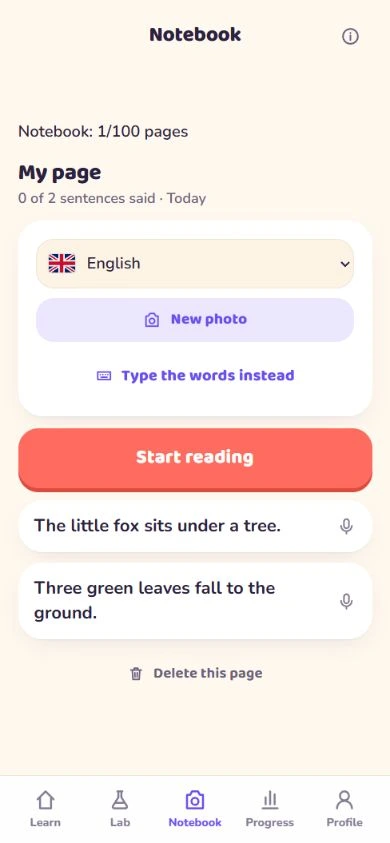
Wunder Tutor Notebook with two typed English sentences and a Start reading button.
Real app screen · Original sample text
Captured 29 September 2026 with a fictional learner.
Snap or upload a page
Photo
Type or paste your words
Text
Sentence at a time
1
Pages saved for another try
100

Six ways to make it yours

A small notebook.
A world of possibilities.

Start with something you already want to say. These simple routines fit around school, work and everyday life.

Listen & write

Make dictation a daily habit.

Add a few sentences from a spelling list or reading passage. Play one, look away from the screen and write what you hear on paper. Compare with the original, then say it aloud.

Try a line like this

“The little bird is sitting by the window.”

Try three sentences. Revisit the words you missed tomorrow.

You check your writing yourself. Notebook gives pronunciation practice, with no automatic dictation marking.

Travel

Practise before you pack.

Type useful phrases in the language you will speak. Rehearse ordering lunch, asking for directions or checking in, one sentence at a time.

Try a line like this

“Could you tell me which platform I need?”

Start with five phrases you expect to use on your trip.

School & homework

Bring the reading home.

Photograph a short passage from school or type a few lines. Listen together, then let your child practise each sentence at their own pace.

Try a line like this

“Our class is learning about the ocean.”

For younger children, choose one short sentence and practise together.

Presentations & interviews

Get comfortable with your opening.

Paste the first few lines of a talk or type an interview introduction. Listen to the words and work on their pronunciation before rehearsing the whole thing.

Try a line like this

“Today I would like to share a new idea.”

Keep it to a short extract, then practise the full talk yourself.

Everyday conversations

Find the words for your day.

Save sentences you want to say at a café, at school or when meeting someone new. Practise saying them clearly before you use them in person.

Try a line like this

“Would you like to join us for lunch?”

Use wording you know is right, from a teacher or a trusted phrasebook.

Your personal collection

Keep the phrases worth repeating.

Add words and short sentences that keep tripping you up. Return to a saved page, listen again and give the difficult lines another try.

Try a line like this

“I usually take the train on Thursdays.”

A few useful lines can make a better practice session than a whole chapter.
From a page to a practice

Bring it. Hear it. Say it.

01

Bring a few lines

Open Notebook, choose the language of your text, then take a photo, upload an image or type your words.

02

Listen, then speak

Check the extracted wording. Open a sentence, listen at normal or slow speed and take your turn with the microphone.

03

Come back to it

With scoring access, review your pronunciation feedback and retry. Reopen saved pages whenever you want another practice.

Choose short, clear text. Photo recognition can make mistakes, so compare the extracted sentences with your original before practising. Notebook reads the wording you provide; it does not translate it into a new language.

A little help getting started

Choose a language.
Keep it personal.

Notebook lets you choose English, Putonghua, Cantonese, Japanese, Korean, French or Spanish for your text. Choose Cantonese for Cantonese reading, and Putonghua for Mandarin.

Across Wunder Tutor, English ↔ Putonghua and English ↔ Cantonese are the focus for full learning support. Other combinations use available translated course meanings, with teaching guidance in English or Chinese. Notebook practises the wording you provide; features and feedback vary by language.

Room for 100 pages

A signed-in account can save up to 100 pages across languages and learners. One photo or typed submission is one page. At the limit, delete a page to make room; saved pages are not automatically replaced.

Text you can return to

Saved text and practice scores can sync to your account. Original photos and replay recordings are not included in Notebook sync.

Read about your data

What would you like to say?

Start with one sentence
that matters to you.

Get the app

Notebook is part of the Wunder Tutor app, coming soon to iOS and Android.